Graphs
x/dag is for apps that show or edit a directed acyclic graph: a data
pipeline, a build, a workflow. It has two packages:
dagis the graph model. It has no user interface and no dependency on the rest of Bellui’s widgets, so you can use it in a server or a command-line tool too.dagwidgetdraws a graph as cards joined by curved edges, and lets the user pan, zoom, select, move, connect and delete, with undo.
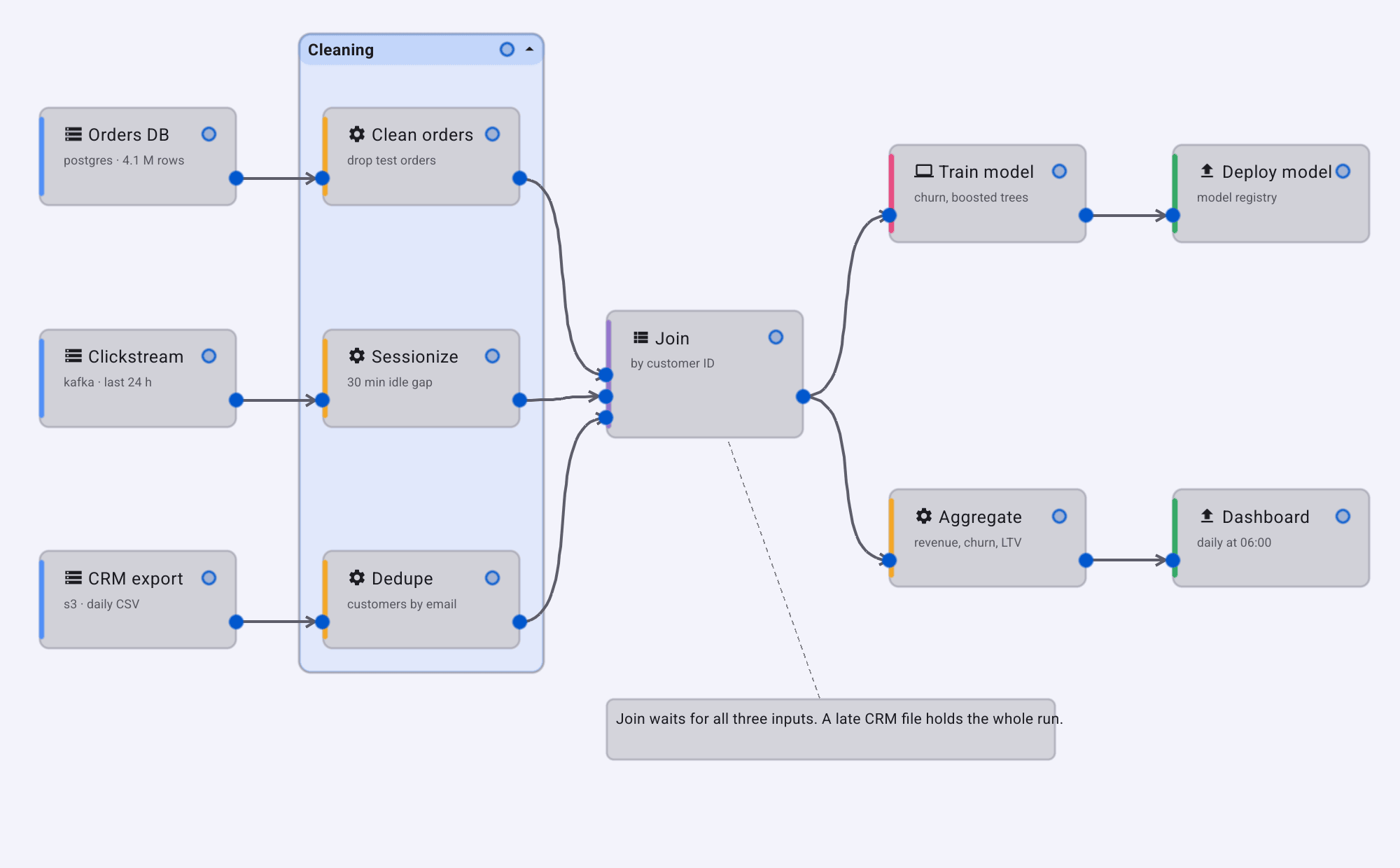
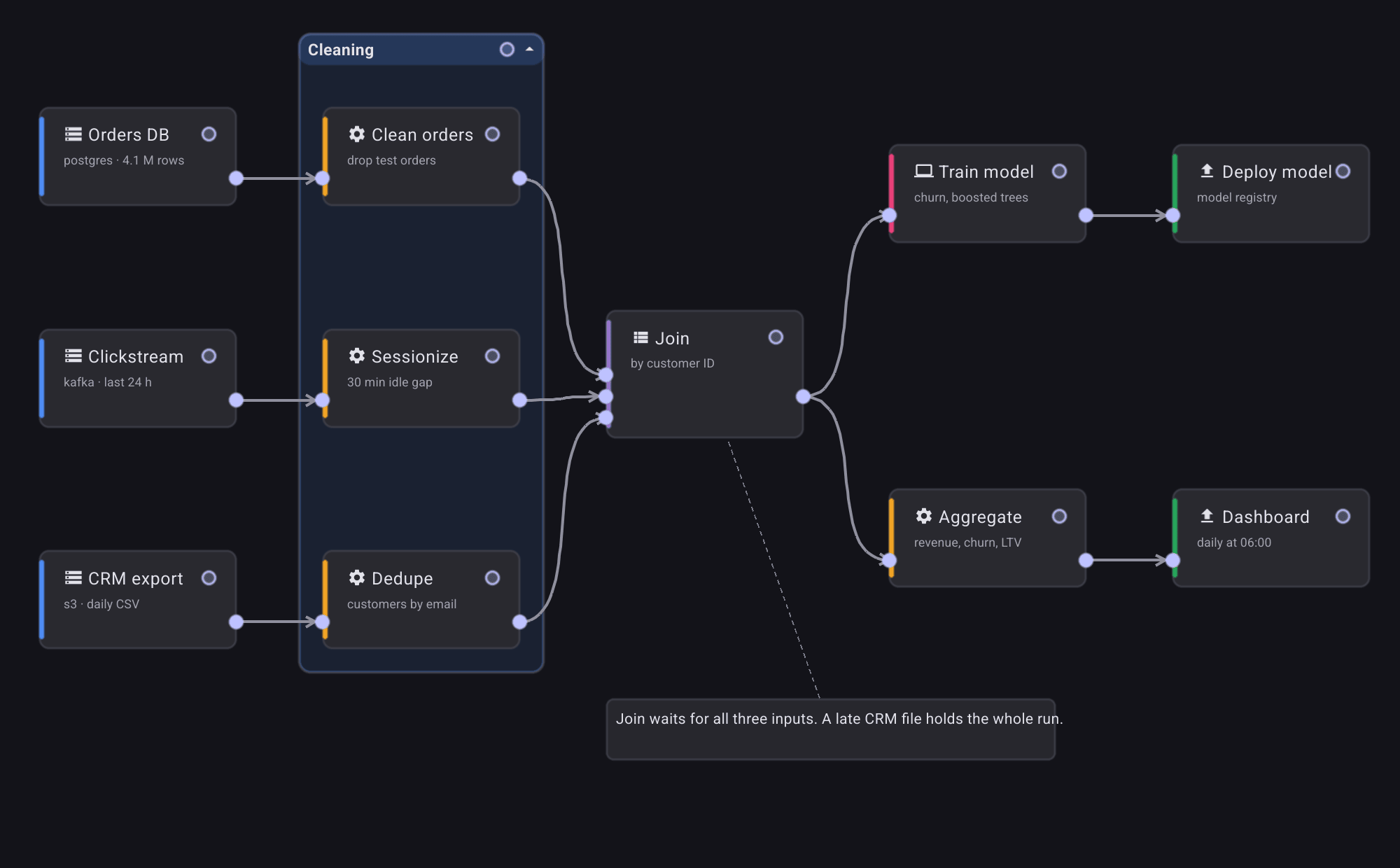
The screenshot shows a pipeline with a group, an annotation anchored to a node,
and cards styled by a NodeStyler (see Node appearance).
Install
go get github.com/belluikit/bellui/x/dag@latestThe graph model
A dag.Graph
holds nodes and edges. A node has named input and output ports, and an
edge always runs from one node’s output port to another node’s input port.
An edge names a port by its node ID and port name, so give the ports of one
node different names: if an input and an output share a name, the edge finds
the input.
g := dag.NewGraph("etl", "Nightly import")

in := func(name string) dag.Port { return dag.Port{Name: name, Direction: dag.PortInput} }
outp := func(name string) dag.Port { return dag.Port{Name: name, Direction: dag.PortOutput} }

_ = g.AddNode(&dag.Node{ID: "read", Label: "Read CSV", Inputs: []dag.Port{in("retry")}, Outputs: []dag.Port{outp("rows")}})
_ = g.AddNode(&dag.Node{ID: "clean", Label: "Clean", Inputs: []dag.Port{in("in")}, Outputs: []dag.Port{outp("out")}})
_ = g.AddNode(&dag.Node{ID: "load", Label: "Load", Inputs: []dag.Port{in("in")}, Outputs: []dag.Port{outp("done")}})

// An edge runs from an output port to an input port. A port is found by
// node and name, so the ports of one node need different names.
_ = g.AddEdge(&dag.Edge{ID: "e1",
	Source: dag.PortID{NodeID: "read", Name: "rows"},
	Target: dag.PortID{NodeID: "clean", Name: "in"}})
_ = g.AddEdge(&dag.Edge{ID: "e2",
	Source: dag.PortID{NodeID: "clean", Name: "out"},
	Target: dag.PortID{NodeID: "load", Name: "in"}})

// The graph refuses an edge that would close a loop.
err := g.AddEdge(&dag.Edge{ID: "e3",
	Source: dag.PortID{NodeID: "load", Name: "done"},
	Target: dag.PortID{NodeID: "read", Name: "retry"}})
fmt.Fprintln(&out, "loop refused:", errors.Is(err, dag.ErrCycleDetected))
AddEdge checks every edge before adding it and returns an error instead if:
- an edge with the same ID is already in the graph (
ErrEdgeExists); - either node does not exist (
ErrNodeNotFound), or either port does not exist on its node (ErrPortNotFound); - the source is not an output or the target is not an input
(
ErrPortDirection); - the target input already has an edge; an input accepts one connection
(
ErrTargetOccupied); - the edge would create a cycle (
ErrCycleDetected); - the graph has a component registry and the two ports carry incompatible
stream types (
ErrStreamIncompat, see Components).
Test for them with errors.Is. WouldCycle asks the cycle question without
adding anything. Removing a node also removes its edges and anything attached
to it.
TopologicalOrder returns the nodes in an order where every node comes after
the nodes it depends on, ready for execution:
order, err := g.TopologicalOrder()
if err == nil {
	for _, n := range order {
		fmt.Fprintln(&out, "run", n.Label)
	}
}
The graph’s methods are safe to call from several goroutines.
Besides nodes and edges, a graph can hold:
- Groups, boxes around several nodes, which can be collapsed. A node is in
at most one group. Group edges say that everything in one group comes
before everything in another, and
TopologicalOrderrespects them. - Link edges, plain lines between two nodes with an optional label. They
carry no data, may form cycles, and are ignored by
TopologicalOrder. - Annotations, text notes placed freely or attached to a node, edge or group.
Saving and loading
data, err := dag.MarshalGraph(g) // PXF text
if err != nil {
	panic(err)
}
g2, err := dag.UnmarshalGraph(data)
if err != nil {
	panic(err)
}
fmt.Fprintf(&out, "reloaded %d nodes and %d edges\n", len(g2.Nodes), len(g2.Edges))
MarshalGraph writes the graph, including positions, groups, link edges and
annotations, as PXF text, the same format Bellui uses for its own settings
files. GraphToProto and GraphFromProto convert to and from the Protocol
Buffers message in dag/dagpb if you prefer another encoding. Loading goes
through the same validation as AddEdge: an entry that is malformed, would
create a cycle or refers to something missing is dropped, and the rest of the
graph loads. Only data that cannot be decoded at all makes UnmarshalGraph
fail.
Layout
dag.LayeredLayout computes a position for every node. It puts the nodes in
layers by the longest path that reaches them from a node with no inputs, with
data flowing left to right, and orders each layer to reduce crossing edges. It returns the positions
without changing the graph. NeedsLayout reports whether a graph arrived
without positions, for example from code that never set them.
The canvas
dagwidget.NewDAGCanvas
shows a graph and lets the user work with it:
g := pipeline() // nodes and edges, all at position (0, 0)
c := dagwidget.NewDAGCanvas(g)
if dag.NeedsLayout(g) {
	_ = c.AutoLayout() // left-to-right layers
}

status := widget.NewLabel("Click a node.")
c.OnNodeSelected = func(id string) { status.SetText("Selected " + g.Nodes[id].Label) }
c.OnGraphChanged = func() { status.SetText("The graph changed.") }
AutoLayout runs the layered layout and moves the nodes, as one step the user
can undo.
What the user can do with the mouse and keyboard:
- Pan by dragging empty space; zoom with the scroll wheel, centred on the pointer.
- Select a node, edge, group or annotation by clicking it. Double-click or
Enter activates a node or group (
OnNodeActivated,OnGroupActivated), for example to open its settings. - Move a node by dragging it, and resize it with its handle. Dropping a node into a group makes it a member.
- Connect by dragging from an output port to an input port. The pointer only snaps to ports where the edge would be valid. Dragging an edge’s end away from its port detaches it.
- Delete the selection with Delete or Backspace. Undo and redo with the usual shortcuts.
- Right-click an element to fire its
On...SecondaryTappedcallback, which receives the pointer event so you can show a context menu there.
When you add or remove things from code, use the canvas’s own methods
(c.AddNode, c.RemoveNode, c.AddGroup, and so on). They change the graph
and update the drawing together. After replacing the whole graph, call
LoadGraph.
Read-only canvases
Capabilities
decides which edits the user may make. A new canvas allows everything. The zero
value allows nothing, which suits a monitoring view: the user can still pan,
zoom and select.
editable := widget.NewCheck("Editable", func(on bool) {
	if on {
		c.Capabilities = dagwidget.AllCapabilities()
	} else {
		c.Capabilities = dagwidget.Capabilities{} // read-only
	}
	c.Refresh()
})
editable.SetChecked(true)
Each field covers one kind of edit, such as ConnectEdges, MoveResize or
RemoveNodes. Capabilities limit only the user. Your own code can still change
the graph.
Node appearance
Set c.NodeStyler to a function that returns a
NodeStyle
for each node: an icon, a subtitle and an accent colour. Base it on the node’s
TypeTag or Metadata. Call RefreshNodeStyles after changing it.
Components, palette and properties
For an editor where users build graphs from a fixed set of building blocks,
describe each block as a
dag.Component:
its ports, the stream type each port carries, and its configurable properties.
Put them in a registry, and give the registry to the graph:
text := dag.StreamType{Name: "text/line"}
reg := dag.NewRegistry()
reg.MustRegister(&dag.Component{
	ID: "file_source", Name: "File", Category: "Sources",
	Outputs:    []dag.PortDef{{Name: "lines", Direction: dag.PortOutput, Stream: text}},
	Properties: []dag.PropertyDef{{Key: "path", Label: "Path", Kind: dag.PropertyString, Default: "input.txt"}},
})
reg.MustRegister(&dag.Component{
	ID: "grep", Name: "Grep", Category: "Transforms",
	Inputs:     []dag.PortDef{{Name: "in", Direction: dag.PortInput, Stream: text}},
	Outputs:    []dag.PortDef{{Name: "out", Direction: dag.PortOutput, Stream: text}},
	Properties: []dag.PropertyDef{{Key: "pattern", Label: "Pattern", Kind: dag.PropertyString, Required: true}},
})
reg.MustRegister(&dag.Component{
	ID: "stdout", Name: "Print", Category: "Sinks",
	Inputs: []dag.PortDef{{Name: "in", Direction: dag.PortInput, Stream: text}},
})

g := dag.NewGraph("p1", "Untitled")
g.Registry = reg // edges between incompatible stream types are refused
With g.Registry set, an edge is refused unless the source port’s stream type
matches the target’s. The stream type named * matches anything.
dagwidget has two widgets that work with the registry. The palette lists
the components by category; the user clicks one, or drags it onto the canvas,
to add a node. The properties panel shows a form for the selected node’s
properties, a group’s label and colour, or an annotation’s text. Edits made
there go through the canvas’s undo stack.
c := dagwidget.NewDAGCanvas(g)
palette := dagwidget.NewPalette(reg, c) // click or drag a component onto the canvas
props := dagwidget.NewPropertiesPanel(reg, c.Commands)
props.CanvasRef = c

c.OnNodeSelected = func(id string) { props.SetNode(g.Nodes[id]) }
c.OnGroupSelected = func(id string) { props.SetGroup(g.Groups[id]) }
c.OnAnnotationSelected = func(id string) { props.SetAnnotation(g.Annotations[id]) }
c.OnSelectionCleared = func() { props.SetNode(nil) }
A node made from a component stores its property values as JSON in
Node.Metadata, starting from each property’s Default.
Licence
x/dag is BSD 3-Clause licensed, like Bellui. Its Protocol Buffers messages
are declared in the package bellui.dag.v1.